
“One customer. Every channel. A better experience.”
Contact centers used to be a room full of agents and a phone system. Today they are the front line of your brand. Customers expect to reach you by phone, chat, email, text, or social media, and they expect you to know who they are when they do. For many US businesses, especially small and mid-sized ones, Contact Center CCaaS in USA is how they meet that expectation without building and maintaining expensive on-premises infrastructure.
This guide covers what CCaaS is, why it matters for US businesses, what features to look for, and how to choose a solution that fits.
What Is CCaaS?
CCaaS is a cloud-based platform that delivers contact center capabilities as a subscription service: call routing, omnichannel messaging, agent desktops, analytics, workforce tools, and more. Instead of buying hardware and licenses, you pay for the seats and features you need, and the provider handles hosting, updates, and uptime.
For US businesses, that means you can add agents quickly during a seasonal rush, support remote or hybrid teams, and adopt new technology like AI without a major infrastructure overhaul.
Why CCaaS Matters Now
Customers Expect Omnichannel Service
Customers want to start a conversation on one channel and finish it on another without repeating themselves. A true omnichannel platform gives agents a unified view of every interaction, so they can respond faster and with more context. The result is higher satisfaction and fewer frustrated callbacks.

“Meet your customers where they are, without making them repeat themselves.”
Compliance Is Non-Negotiable
If you operate in healthcare, financial services, or any industry that handles sensitive data, your contact center is a compliance surface. Regulations like HIPAA and PCI DSS shape how you record calls, store data, and verify identities. A well-designed CCaaS deployment builds in encrypted call recording, secure storage, and detailed audit trails, and aligns with security frameworks such as NIST, so you stay audit-ready.
AI Is Changing What Agents Can Do
AI in the contact center is practical now, not experimental. Common uses include:
- Virtual agents and chatbots that handle routine questions around the clock and escalate to a human when needed.
- Agent assist tools that summarize conversations, suggest next-best responses, and surface knowledge articles in real time.
- Sentiment and speech analytics that detect tone and trends across voice and digital channels.
- Predictive analytics that flag churn risk and anticipate issues before they escalate.
The point is not to replace people. It is to take repetitive work off agents so they can focus on complex, high-value conversations.
Core CCaaS Features to Look For
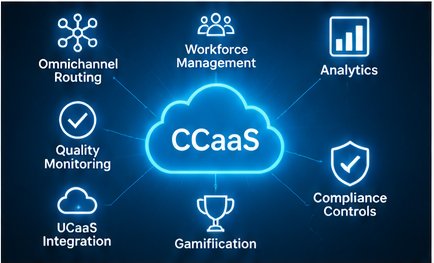
“The features that turn customer conversations into measurable business results.”
- Omnichannel routing: voice, chat, email, SMS, and social in one unified workspace.
- Workforce management (WFM): forecasting, scheduling, and real-time performance dashboards.
- Speech analytics and transcription: insight into every call, at scale.
- Quality monitoring and coaching: tools that connect performance data to agent development.
- Gamification: leaderboards and recognition that boost engagement and morale.
- UCaaS integration: a connection between your contact center and your business phone and collaboration tools, so employees outside the contact center can pull in subject-matter experts easily.
- Compliance controls: encryption, role-based access, audit logs, and secure recording.
The Business Case
A modern contact center delivers value in four areas: a better customer experience, greater operational efficiency, higher agent productivity, and better data for decision-making.
On the return side, a Microsoft and IDC study on AI adoption found organizations realize about $3.50 for every $1 invested, with leading adopters reporting around $8 per $1. Results vary by organization, but the takeaway is that modernizing with a clear strategy can pay off.
It also matters across the leadership team. CEOs care about brand reputation. CFOs care about cost savings and ROI. CIOs and CTOs care about efficiency and future-proofing. CROs care about retention and revenue. A well-planned contact center supports all of them.
Industries That Benefit Most
- Healthcare: HIPAA-aligned patient communications, appointment reminders, and secure messaging.
- Finance and insurance: PCI DSS-ready recording, identity verification, and fraud-focused analytics.
- Distribution and logistics: proactive order updates and omnichannel support across the supply chain.
- Manufacturing: smarter routing for customer, dealer, and equipment support.
- Transportation and maritime: real-time communication for drivers, crews, and dispatch.
- Residential services: coordinated scheduling, dispatch, and customer service.
How to Choose a CCaaS Solution
- Start with outcomes, not features. Define what you want to improve first, such as wait times, first-contact resolution, retention, or compliance posture.
- Stay vendor-flexible. No single platform fits every business. Compare several providers against your requirements, whether you need five seats or thousands.
- Check integrations. Make sure the platform connects to your CRM, UCaaS, and line-of-business applications.
- Verify compliance. Confirm the provider supports the regulations that apply to you, and ask for specifics.
- Plan for scale. Choose a solution that grows with you rather than one you will outgrow in a year.
- Get independent guidance. A vendor-agnostic technology advisor can assess options objectively and help you avoid costly mismatches.
Frequently Asked Questions (FAQs)
What is the difference between CCaaS and UCaaS?
UCaaS covers everyday business communications such as voice, video meetings, and team messaging. CCaaS is built for customer-facing interactions, with routing, queues, analytics, and workforce tools. Many businesses integrate the two so employees and agents can collaborate easily.
Is CCaaS only for large enterprises?
No. Because it is subscription-based and scalable, CCaaS works for small and mid-sized businesses as well as large organizations.
Can CCaaS support remote and hybrid agents?
Yes. Because the platform runs in the cloud, agents can work from anywhere with a secure internet connection while supervisors keep full visibility.
How does CCaaS help with HIPAA or PCI DSS compliance?
Look for encrypted call recording, secure storage, access controls, and audit trails. Compliance is shared between you and your provider, so confirm responsibilities in writing and work with an advisor who understands your regulatory requirements.
Will AI replace my agents?
AI is best used to enhance agents, not replace them. It automates routine inquiries and provides real-time guidance so people can focus on complex, empathetic conversations.
How long does implementation take?
It depends on size, integrations, and complexity. A small deployment can go live in weeks, while larger or more regulated environments take longer. A phased rollout reduces risk.
Can I keep my existing phone system or CRM?
Often, yes. Many CCaaS platforms integrate with existing UCaaS and CRM tools. Review integration requirements early.
How do I know if I am ready for CCaaS?
Common signs include long wait times, customers repeating themselves across channels, limited reporting, difficulty scaling for busy seasons, and compliance concerns.
Ready to Modernize Your Contact Center?
Your customers are calling, chatting, and texting right now. The right CCaaS strategy helps you meet them where they are, with the experience they expect and the compliance protections your business requires.
Real Resultz helps US businesses design vendor-agnostic CCaaS and UCaaS solutions built around measurable outcomes. Call 833-421-5678 or schedule a free 30-minute discovery call to get started.